Force Update User
This feature's major use case is to send a notification to the user informing them that they are running an outdated version of an app and that a newer version is available in the store for them to upgrade.
Keycloak will handle the Force Update previously it was managed on SSMS.
How it Works?
Keycloak
The following keys and Values should be configured in Keycloak (Tenant -> Realm Settings -> Settings).

App
For the force update feature to function, we must obtain the above-mentioned data from Keycloak. To ensure sure the work is done, the get app details API will be used.
Get App Settings
Resource Informations
| Name | Value |
|---|---|
| Requires authentication? | Yes |
| Rate limited? | No |
Request
Request headers
| Key | Value |
|---|---|
| Authorization | Bearer token |
| Content-Type | application/json |
HTTP request
POST https://{hostname}/auth/realms/{realm}/v4_realm/appsettings
API requests must be made over https. Calls made over plain http will fail.
Parameters
No parameter fields are required.
Request body (* Required)
| Field Name | Type | Description |
|---|---|---|
| flutter_ios_version | String | Key to fetch IOS Version. |
| flutter_android_link | String | Key to fetch the link through which the android app can be updated. |
| flutter_android_version | String | Key to fetch Android Version. |
| flutter_android_update_by | String | The date before which the android app must be updated. |
| flutter_ios_update_by | String | The date before which the IOS app must be updated. |
| flutter_ios_link | String | Key to fetch the link through which the IOS app can be updated. |
| flutter_android_build_number | String | Key to fetch the android app build number. |
| flutter_ios_build_number | String | Key to fetch the IOS app build number. |
Sample Request
curl --location --request POST https://{hostname}/auth/realms/{realm}/v4_realm/appsettings
--header 'Content-Type: application/json' \
--data-raw '{
"keys": [
"flutter_ios_version",
"flutter_android_link",
"flutter_android_version",
"flutter_android_update_by",
"flutter_ios_update_by",
"flutter_ios_link",
"flutter_android_build_number",
"flutter_ios_build_number"
]
}'
Sample Response
{
"flutter_ios_version": "4.8.0",
"flutter_android_link": "market://details?id=com.tr.note.bbi.ram",
"flutter_android_version": "4.8.0",
"flutter_android_update_by": "20.04.2022",
"flutter_ios_update_by": "20.04.2022",
"flutter_ios_link": "https://apps.apple.com/ca/app/i-ram-senin/id1534342254",
"flutter_android_build_number": "0000",
"flutter_ios_build_number": "0000"
}
Response Status Information
This API will be called by the app at each login.
If the following conditions are met the message provided as a response will be displayed in the app.
Case 1:
Condition:
- The API build number should be greater than the App build number.
- The Update _by date should be greater than the Current date.
Response:
- An update for your application is available.
- You can continue to use this version of app until {Update_by – Current date} days.
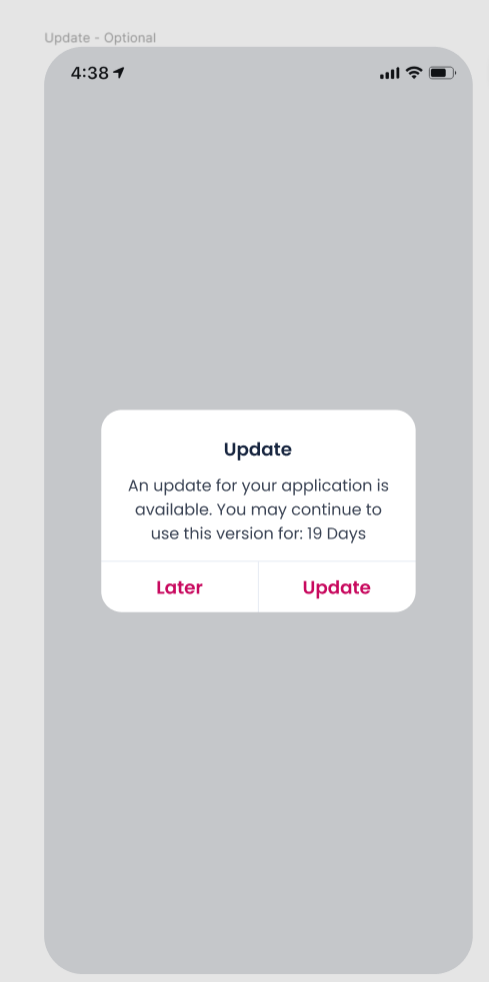
- Later: By clicking on this button the user can still login and process the application.
- Update: By clicking on this button the user will be directed to the corresponding app stores.
Case 2:
Condition:
- The API build number greater than to the App build number.
- The Update _by date should be lesser than the Current date.
Response:
- An update for your application is required.
- Update your application to continue using it.
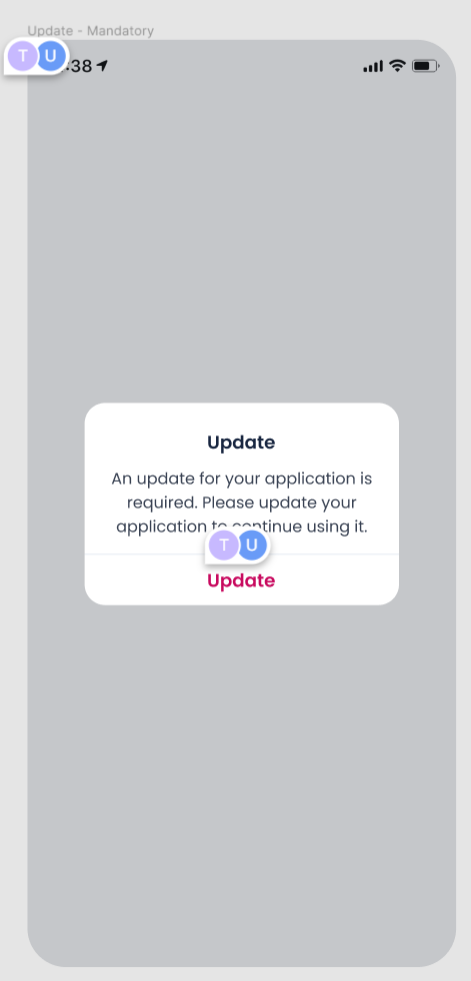
- Update: By clicking on this button the user will be directed to the corresponding app stores.
- The Pop-up can’t be dismissed and if the user is logged in, they will be logged out.